

I’m excited to announce something I’ve been working on that’s going to save you a lot of time every morning.
Starting now, at the bottom of every daily trade plan you’ll find a new section called TradingView Indicator String. It’s a block of formatted text containing every key level from that day’s plan. You copy it, paste it into the S&P Edge Levels indicator settings on TradingView, and every single level is instantly plotted on your chart — color-coded, labeled, and ready to go.
No more manually drawing 30+ lines each morning. No more accidentally missing a level. One paste and your chart matches the trade plan.
What It Does
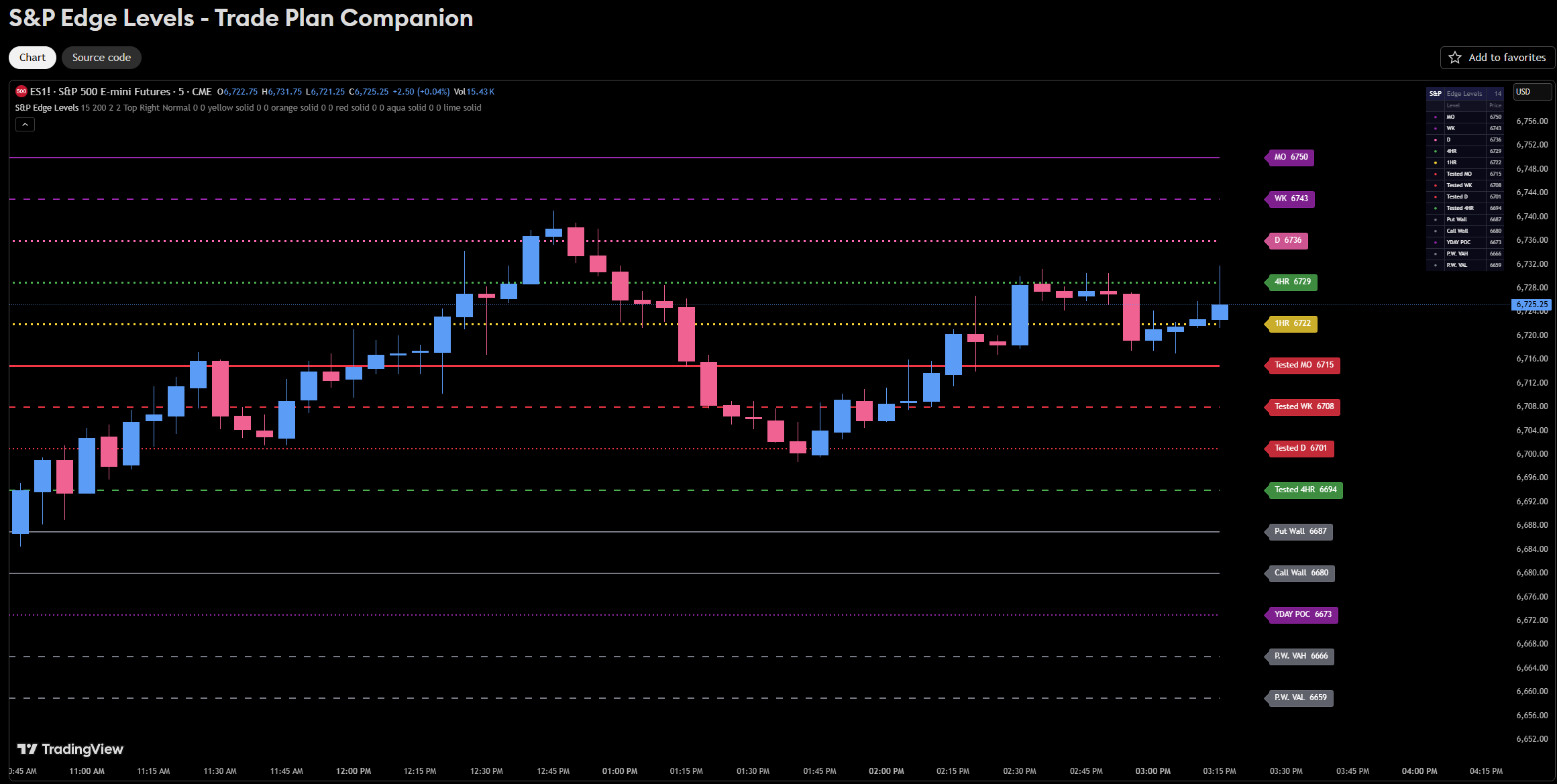
The indicator takes the level string and automatically plots each level as a horizontal line directly on your price chart. Each level type gets its own color and line style so you can distinguish them at a glance:
🟣 Monthly and Weekly levels show in purple (solid and dashed)
🩷 Daily levels show in pink
🟢 4-Hour levels show in green
🟡 1-Hour levels show in yellow
🔴 Tested levels show in red so you immediately know which levels have already been played
⚪ Put Walls and Call Walls show in gray
🟣 Yesterday’s POC shows as a purple dotted line
⚪ Previous Weekly VAH/VAL show as gray dashed lines
Beyond the trade plan levels, the indicator supports 42 different color and style combinations if you want to add your own custom levels on top of what’s provided.
Other Features
Proximity Highlighting — When price gets close to a level, the line automatically thickens so you can see which levels are in play without scanning the whole chart.
Dashboard — A compact table sits in the corner of your chart listing every active level with its name and price. Toggle it on or off depending on your preference.
Zone Support — Price ranges plot as two lines with a shaded fill between them, perfect for visualizing demand and supply zones.
Tooltips — Some levels include notes that appear when you hover over the label, giving you additional context without cluttering the chart.
5 Manual Slots — Need to add a level that isn’t in the trade plan? The indicator has 5 manual level inputs in the settings where you can add your own levels with custom colors and styles.
How to Get It
The indicator is free and available now on TradingView. You can find it here:
S&P Edge Levels — Trade Plan Companion
Add it to your chart, and starting with the next trade plan, just copy the string from the bottom and paste it in. That’s it.
If you have any questions or run into any issues getting it set up, reach out and I’ll help you get it dialed in.
Until next time—trade smart, stay prepared, and together we will conquer these markets!
Ryan Bailey,
VICI Trading Solutions.
Here is a test string so you can See how it works. Just copy and paste this in directly.
6750.00|MO|M
6743.00|WK|W
6736.00|D|D
6729.00|4HR|4H
6722.00|1HR|1H
6715.00|Tested MO|TM
6708.00|Tested WK|TW
6701.00|Tested D|TD
6694.00|Tested 4HR|T4
6687.00|Put Wall|G
6680.00|Call Wall|G
6673.00|YDAY POC|PDOT
6666.00|P.W. VAH|GD
6659.00|P.W. VAL|GD
thank you so much for sharing